
Screenshot Monitoring Software with Time Tracking
Verify work progress with transparent screenshot timelines and activity context.
Screenshots that support fair work reviews
WHM captures screenshots during work sessions and connects them with time, project, application, website, and activity data. Managers get useful context for work verification while employees remain aware that tracking is active.
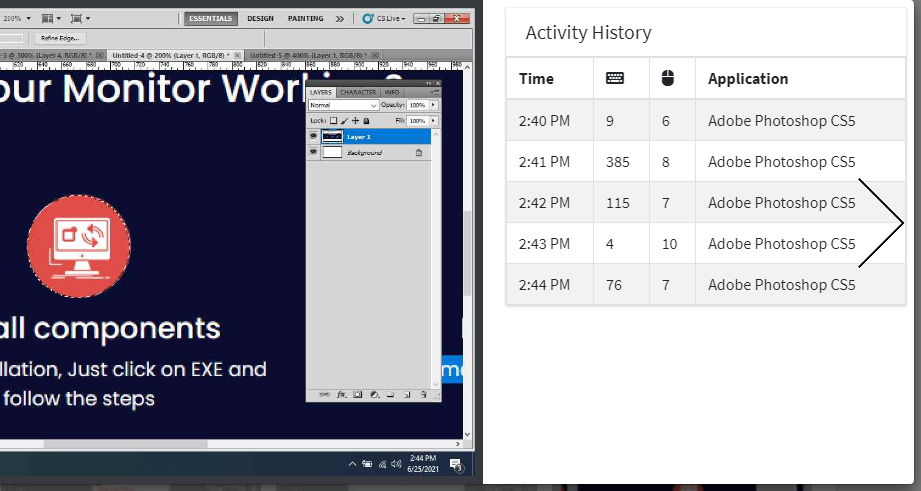
Automatic Capture
Capture screenshots during work sessions based on company settings.
Timeline Review
Review screenshots with work sessions, time totals, apps, and websites.
Work Proof
Use screenshot context for remote work, freelancer validation, QA, and project reviews.
Screenshot monitoring with business context
Screenshots are most useful when they are connected with time, projects, apps, URLs, and activity history. WHM helps managers review work progress with context, making screenshot monitoring more transparent and practical for distributed teams.
Where screenshots help
- Remote work validation without constant calls or status messages.
- Freelancer and agency work proof for client-facing projects.
- QA, support, operations, and back-office activity review.
- Project delivery checks when timelines or billing need support.
Good rollout practices
- Tell employees when screenshots are captured and why.
- Review screenshots with time and activity context.
- Limit report access to people who need it.
- Define screenshot review and retention expectations clearly.
Screenshot Monitoring FAQs
Does WHM capture screenshots during work hours?
Yes. WHM captures screenshots during tracked work sessions and displays them in a timeline with activity context.
Can managers review screenshots with app and URL usage?
Yes. Screenshot reviews are connected with tracked time, application reports, website reports, and non-productive usage context.
Is screenshot monitoring useful for remote teams?
Yes. It gives managers work proof and project context without relying only on manual status updates.